Showing posts with label Tech tips. Show all posts

Saturday, July 30, 2022

Interview: AGVs and AMRs in the Industry 4.0

I was interviewed recently about what the AGVs and AMRs are, and why they are so important for the industry. Although the interview is in Spanish, I share with you the written translation of the interview in English.


click to see the interview (in Spanish)


Could you explain what automated intralogistics vehicles are and what they are useful for?


There is no doubt that the industry increasingly requires to operate in an automated way, otherwise, it could not serve the growing demand of the market, while reducing costs and improving the quality of the products and processes.

One of the ways to go in this direction is to use what are called automated intralogistics vehicles, which can move material completely unattended.

I'll give you two examples:


Case 1: Automotive manufacturing

The first example is in the automotive sector, where car assembly lines operate continuously and therefore require a constant flow of parts from what is called the kitting area, which is where the parts are located, to the assembly area. In this case, the automated vehicles deal precisely with this task without pause, communicating and interacting on their way with different elements of the factory such as doors, elevators, robotic cells, and even people if needed.

Case 2: Online Shopping

Another example is that of the orders we make online to Amazon, Zara, or Aliexpress, among others, in some cases with delivery times on the same day. This would be impossible without automation.

In this case, your order enters the web and from here it enters the supplier's order and warehouse management system. These systems are connected to a Fleet Management System, which manages the dozens or hundreds of automated vehicles that will pick up the products of your order and take them to the picking area, where the operator or even a robot introduces them into the box that then arrives at home.

In all this process there are a lot of technologies involved, such as artificial intelligence algorithms, perception systems, artificial vision, etc.


Could you briefly tell us about the difference between the two types of automated vehicles you mentioned: AGVs and AMRs?


AGVs, an acronym for Automatic Guided Vehicles, normally follow a band on the floor, which is like a road with forks. It is a very proven and very safe technology to drive the vehicle along fixed routes.

While the AMRs, acronym for Autonomous Mobile Robots, do not require these bands, using other sensors, such as laser scanners or artificial vision based systems and have a greater decision-making capacity, such as to avoid a person or decide the best route to reach a destination.

The important thing is to choose the technology that best meets the needs of the industry in each case.


Friday, July 29, 2022

AMR-One. 03 Architecting the solution

This is the third on the series of posts about the AMR-One Project. Today I will talk about architecting the solution.

In the previous post I described the requirements, so we know now what are the functions that the system should accomplish. But before defining the tasks to accomplish these requirements, we need to have an idea of how are we going to build the solution. For that, some people tend to create more technical requirements, in the language of the developers. I prefer to spend some time working on a pre-design of the whole system, from the mechanical, electrical, and software sides, involving representative people from each of the disciplines. It is essentially an iterative process, but having a basic architecture already opens minds to understand the tasks needed to build the system. 

When we have this general pre-design of the system, we could go further on the class definition for SW, materials for mechanics, or technologies for hardware.

Let's see as an example how this architecture has been defined in the AMR-One project.


The AMR-One case

As we saw in the episode about the roadmap, there are at least two versions of the product, with different functionalities. But we will consider the mechanical, hardware, and software approach for both versions 1.x and 2.x.


The mechanical approach

The mechanical approach starts with an overall analysis of the kinematics of the needed system, then continue with some freehand sketches and then with some draft ideas using some computer tools, but not going in deep on the design.

The hardware architecture

The hardware and electrical architecture define the components (sensors and actuators) but what is more important, helps to define the processing systems and the functions assigned to each of them. (click on the image to see it bigger)


HW architecture


We define 4 processing systems: 

  • Safety PLC (Flexisoft)
  • Low-level controller (LLC)
  • High-level controller (HLC)
  • Cloud base system

Going a bit further on the functions assigned to them we have that:

  • The Safety PLC is responsible for ensuring the safety measures are executed reliably. It uses several inputs (Safety Lidar and safety stop buttons) to determine when there is a dangerous situation and the system should stop. There is therefore a program inside this PLC to ensure this behavior.

  • The Low-Level Controller (LLC) is responsible for the Low-Level functions, which are the following:
    • Sensory reading
    • Traction motors PIDs controls
    • Velocities (linear and angular) conversion into inputs for the PIDs controls
    • Magnetic guidance
    • RFID tags reading and execution of actions
    • Pinhook control
    • Buzzer control for warnings
    • Device HMI data
    • ROS publisher to connect with HLC/Cloud Monitoring
    • ROS publisher/subscriber to connect with HLC/ROS navigation (AMR-One v2.0)

  • The High-Level Controller (HLC) is responsible mainly for:
    • Communication with the LLC
    • Communication to the cloud
    • User interface (AMR-One v2.0)
    • Localization, navigation, and mapping based on ROS (AMR-One v2.0)

  • The cloud-based processing system is not described in the hardware architecture because it would not require additional hardware from us.

The software structures

As mentioned, there are four processing systems, each of them with programs inside. 

The structures are quite self-explanatory. Only to mention that the items with yellow background correspond to v2.0 of the project and the rest correspond to v1.0 (click on the images to see them bigger)


See the following video for more details:


Now we know how to approach the solution and we are prepared to work on building a Work Breakdown Structure to define the Epics and tasks of the project, but this will come in the next post.

Sunday, May 15, 2022

AMR-One. 00 Introduction to the AMR-One Project

This post is the introduction to the AMR-One project series, a set of posts and videos on how to plan, manage and execute a technical project as well as on how to technically develop an autonomous robot.

The AMR-One project objective is to develop a prototype of an autonomous mobile robot for the industry, as a personal project, with some basic characteristics:

  • Rotational base with damped traction system
  • Safety system
  • Pinhook system to hook trolleys from the bottom and carry them.
  • Two navigation modes:
    • Magnetic band guidance with RFID tags control
    • SLAM based navigation using ROS
  • Cloud monitoring (over AWS)


High, this is Alejandro Alonso and I will be here, through this interesting trip, where we will explore the details of this fascinating project!

During the following posts I will cover:

  • The product strategy, roadmap, and product requirements (basic to have good focus and scope definition).
  • The project management aspects, including
    • The project management plan (rules on how to manage the project)
    • Work breakdown structure (tool to identify the tasks)
    • Planning from an agile perspective, including the Gantt and dependency graph as well as backlog and sprints plan
    • Risk management, 
    • Cost and time control
    • Change management control, to approach correctly any change in the project
  • The technical design, covers:
    • The architecture of the system, both hardware, and software
    • Electrical design
    • Mechanical design
    • Software design
  • The manufacturing process, using modular structures and a few 3D printed parts

See the following introductory video.


I hope you enjoy this trip with me. Let’s make robots!

Monday, May 2, 2022

Cloud Monitoring for robots as IOT using AWS

AWS is a great Cloud Computing platform for many applications. Here I describe how I integrated ROS based mobile robots with IoT (IoTcore), Elasticsearch (Opensearch), and Kibana (OpenSearch Dashboards) to get Cloud Monitoring.


This video explains that under a personal project named "AMR-One" that covers the design and development of AMR-based solutions.

Link to the video: https://youtu.be/k_uQZ-rj-6M 


Related posts:

Friday, April 23, 2021

Work with external developers! Seriously?

[5 minutes reading]
We are in a very fast technological world, where we need to surf over the waves all the time. As companies, we need to give more and more added value to customers, not to beat the competitors, but to help customers with better solutions, that also help them to be better productive companies.
To do so, many companies only look at their internal resources and try to do everything on their own, instead of looking for other companies or freelancers to help them. This usually happens due to some incorrect assumptions:

  • Our product is "secret” so my intellectual property is at risk if I use external developers. WRONG!
  • No one understands our products except our employees. WRONG!
  • The cost of working with external developers is too high. WRONG!
  • I will later have dependencies on external developers for maintenance. WRONG!
  • …and many other

Some others think in the opposite way, but sometimes with wrong considerations:
  • Incorporating external professional resources will give as fast results in a short time. WRONG!

The reality is as follows:
  • In many cases, companies do not have the capacity to overcome all the developments needed, and therefore, or they delay deliveries, or lose market opportunities.
  • In most cases, it is possible to fragment developments in parts, modules, or services, so internal people could focus on the core "secret intellectual property" parts and external developers could work on the rest.
  • You have to focus on doing well what you do well. If you want to be on everything you will lose focus and opportunities
  • Using good external developers, even being more costly than internal resources, in the end, could be less costly because you may use your internal resources for other more valuable developments and external resources, in the long run could do the work faster.
  • Working with external developers as part of a team helps your internal resources to learn from the external developers and do a smooth technology transfer while development is done, so no dependencies will later exist from external developers.

So, externalizing development is a good option, but you need to have some extremely important considerations, especially when you start working for the first time in this way:
  • The external development service most of the time requires very clear requirements, usually more detailed than the ones you might use internally, because they do not know many internal assumptions you usually have, due to your knowledge of your products. So consider it will take time from your side. 
  • Set clear short-time deliverables, in an agile manner. This will allow getting results and integrating them into your product soon.
  • Set weekly meetings with the external developers, to follow up on progress. This meeting is not to make pressure, but to help the external service to have a clear common understanding during development.
  • Encourage your team to work frequently with your external developers during the development process and involve them in the testing phases. This is an investment of time from your resources that will give you two things: a) smooth knowledge transfer of the guts of the development for future maintenance, b) help your team to learn from other professionals.

  • But there is probably one of the most important things you have to consider: Having external development services is an investment, not a one-time work. The first time you work with an external service, it will take you time, effort, and money just to help them understand your projects, your standards, your methods, your products, and learn to work together as a team, so do not expect fast and cheap results in the first work. But, this investment in time, money, and effort will greatly help you in subsequent works asked for the same development service. They will work with you like one, already knowing your team, your expectations, your product, your culture, your standards, processes, and methodologies. This is when you really start getting the fast and good delivery, worthing the effort, time and money spent in the past. This is what the graph at the beginning explains.

In the end, it is more a strategic decision than a quick-fix solution for internal capacity problems. Working with external developers, before you have serious capacity problems will help to be prepared for the peaks and valleys that will come.

Sunday, February 21, 2021

Why demos are like demons for developers?

[5 minutes reading]

If your team of developers consider demos are a stressfull waste of time that delays development, then you may have an issue that this post could help to solve.

Some weeks ago, a robotics engineer working for a company in Singapore shared to me his concern with his boss, who was asking for a weekly demo to potential customers of an uncomplete prototype. This is quite a common situation and the reason why I decided to write this post.

It is clear that demos are key for a business success. Having customers and stakeholders involved in demos gives them not just a way to evaluate a product, but also a living experience. We are rational, but also emotional. Demos should also touch the rational and emotional inside of the audience. But why developers think demos are demons conspiring against development?

  • Sometimes because demo preparation takes long, as reinventing the wheel every time.
  • other times because it involve the same developers and the team do not see them as an opportunity to get good feedback for development and business.

  • and many other, the product or prototype is not properly tested and mature for a demo, so the stress of developers for a highly probable demo failure is too high

But really there are really good things we could do about demos. Let me tell you some key actions I recommend to follow:

  • Have clear requirements of what the demo should do. These requirements usually are a subset of the product requirements and will give clarity on what features will be part of the demo.
  • Prepare a demo as much standard and automated as possible, so it could be executed with minimum amount of supporting people. This reduces cost of demo and transmit simplicity to the audience.
  • Prepare a written Demo Plan, describing roles of people involved in the demo, what should they do, in what sequence, describing the preparation of the demo, the execution and the post-demo actions. 
  • Keep always one unique interlocutor for each demo, who would give turns to others to clarify specific points of the demo if needed.
  • Before doing a demo, ensure the features have been tested properly and a rehearsal of demo is done.
  • Share with the development team clear reasons why demos are important and a good way to test, learn and correct features, as well as for the business.
  • Rotate the responsibility of doing a demo between different people, so they could learn and dilute stress between each other. Consider also doing demos with sales or product management team instead of developers as main executors of the demo, may be with a developer as support in case of doubts. This shows simplicity to audience and usually sales and product management  people are more adequate for communication with customer than developers.
    If your company requires doing demos with developers, take care of the amount of demos a developer does. Usually, developers need to develop and could understand dedicating part of their time for demos, but too much time doing demos and low time developing may demotivate them.
  • Give clear expectations to the audience. I saw many times failing demos of products, with the promise to be mature products when they were really prototypes in alfa version. Being sincere to the audience on what you are showing will ensure adequate expectations and prevent deception and stress if something wrong may happen. Anyone could understand a failure if they know is an alfa/beta version but not if they believe it is a finished product.

At the end demos are important and necessary for a company success. The way we prepare and do demos will directly influence the mood of the people involved in the demo and the experience of the potential customers.

Monday, December 14, 2020

My Compact Lab briefcase. Ideas for Christmas gifts?

This is not my usual kind of post, but a friend told me it would be a good idea to share details of my compact lab briefcase, as may give ideas for gifts in these Christmas days.

First, I have to say that in the deep of my heart I feel I am a Maker Geek. I love Software, Electronics and Mechanics and over all that, I love making things covering these three disciplines, mainly in the field of automation and robotics.

During these last few years, I have been collecting items slowly to have a portable briefcase [Shop] that I could carry anywhere. The objective of this post is to give you details of all items and where to buy them if you like.


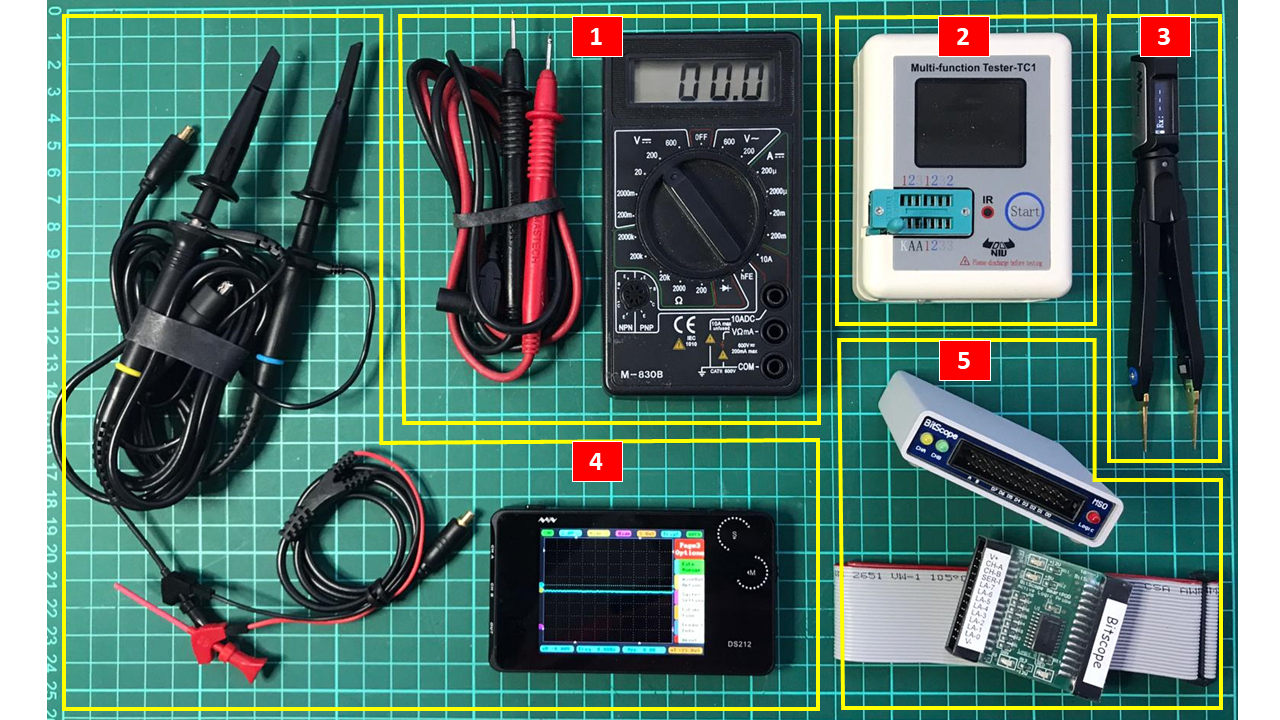
Picture 1


Here you will find all items sorted by groups, with reference to the locations in following pictures and links to manufacturers or online shops.

Electronics Instrumentation

Instrumentation is a collective term for measuring instruments that are used for indicating, measuring and recording physical quantities.

  • Multimeter (Picture 2, Item 1). [Shop] Commonly they are used to measure voltage, resistance and current, although defending on models you may measure transistors, diodes, capacitance, frequency and other. This is the most basic device in electronics. 
  • LCR meter. If your multimeter do not have the functionality to measure inductance, capacitance and resistance with precision, you may need an LCR. In my briefcase I got a small measuring tool (Pic. 2, Item 2) for detecting inductances, capacitors, resistors, diodes, triodes, NPN and PNP transistors, N-channel and P-channel MOSFETs, IGBTs, JFETs, triacs and other components. [Shop]. 
  • Digital Tweezers. (Pic. 2, Item 3). [Shop] This is usually is a sort of multimeter with the shape of a tweezzer, very specific to measure SMD components. In my case mine measures Inductance, capacitance, resistence, diodes, voltage, but also frequency and could generate functions (sine, pulse, noise and custom made). You could see my video about this device here (VIDEO)
  • Oscilloscope. This is one of the most useful instrumentation devices in a laboratory. In my case I have two devices covering this function: a pocket size 2 channel 1Mhz, 10MSa/s Miniware DS212 unit that also has waveform generation capabilities (Pic. 2, Item 4). [Shop] (VIDEO) and a USB BitScope BS10U with active logic probes (Pic. 2, Item 4). [Shop] (VIDEO) that connected to a laptop and using an includes sw gives a bunch of good functionalities: 2 channel 100Mhz, 40 MS/s oscilloscope, waveform generator, 8 channel logic analyzer, protocol analyzer and an RF & Baseband Spectrum Analyzer.

Picture 2

  • Frequency meter: is an instrument that displays the frequency of a periodic electrical signal. It is used fo testing radio equipment, measuring vibration, strain, transducers... In my case this functionality is included in the Items 3, 4 and 5 of Pic. 2 although there are many bench specific devices for this purpose.
  • Arbitrary Waveform Generator (AWG): This tool produces waveforms that can be injected into a device under test and analyzed as they progress through it, confirming the proper operation of the device or pinpointing a fault in it. Also, user defined signals could be defined. In my case this functionality is included in the Items 3, 4 and 5 of Pic. 2 although out of this briefcase I have a portable JDS-2900 [Shop] 
  • Logic Analyzer: Is an electronic instrument that captures and displays multiple signals from a digital system for an analysis based on states, timing and so on. In my case this functionality is included in the Item 5 of Pic. 2. There is anyway a pocket size logic analyzer I tested recently: The Miniware LA104 [Shop] (VIDEO)
  • Protocol Analyzer: This device is used to analyze communication protocols between devices. I use protocol analyzer mainly for CAN, RS232, I2C, SPI. In my case this functionality is included in the Item 5 of Pic. 2
  • Spectrum Analyzer: While an oscilloscope gives a visualization of signals in a time domain, a spectrum analyzer gives that visualization in a frequency domain. It means that the display of a spectrum analyzer has frequency on the horizontal axis and the amplitude displayed on the vertical axis. Very useful for frequency filters and RF based devices analysis. In my case this functionality is included in the Item 5 of Pic. 2
  • Other: Depending on your specific needs you may use other devices like a datalogger, current clamp, EMC and EMF Measuring Instrument...

Power Supplies

A power supply is an electrical device that supplies electric power to an electrical load.

  • Fixed Power Supply: These are the common power supplies we may find at home that supply a specific voltage with no control on current in specifications. In Picture 3 below we find a common 12v 3A Power supply with Barret connector (Item 6), 2A USB Power supply (Item 8) with several cables from USB-A to USB-B, MiniUSB-B, MicroUSB-B, USB-C, sometimes connected via a USB hub (Item 9) with 4 ports or more. 
  • Adjustable Power Supply: There are from the simplest ones that only allow controlling the voltage, to programable power supplies that could be controlled form external devices. The most common electronics power supplies can control both voltage levels and current limits, very convenient when you want to limit the current while testing. In my briefcase I have an extremely portable Digital Power Supply. It is the Miniware MDP-XP (Item 7) [Shop] (VIDEO) that could control voltage and current (up to 30V/5A) from a wide input source (DC4.2V-30V). It also includes a display where actual current draw graphs could be visualized.
  • Batteries: They allow powering devices when you do not have a power outlet available. In my case I found most useful to have an 8000mAh, 5V/2A Power Bank (Item 10) [Shop]. 

Picture 3

With the USB power supply or the 12v/3A fixed power supply, I could power any device from my briefcase if needed, although most of them already have batteries integrated. If I need to use any of them in a place where no power outlet is available, I may use the power bank + adjustable power supply or an adapter to the car lighter. 


Soldering tools

They help soldering of electronic components, cables and other stuff.

  • Soldering Station: consists of one or more soldering tools connected to the main unit, which includes the controls (temperature adjustment). In my case, in order to save space, I got the Miniware TS100 60W soldering iron (Pic.4 Item 48) [Shop] with temperature control (100℃ - 400℃) with 12-24v input. 
  • Heat Gun: is a device used to emit a stream of hot air, usually at temperatures between 100 °C and 550 °C. They are used in electronics to desolder and rework surface-mounted circuit board components, but also used for shrinking tube (Item 43), functional testing of overheat protection devices, in order to safely simulate an overheat condition. Usually they are bulky devices, being the smallest one I found the electric Tacklife [Shop] and the gas Ancor [Shop], but in order to have something ever smaller I decided to take a gas one (Item 49) with deflector [Shop]
  • Blowtorch: This tool produce a flame from butane gas. For that purpose I use a small one (Item 49) with the proper adapter. With it's side could melt some low temperature metals properly and help curving plastic parts.
  • Other Soldering and Desoldering tools: Many other tools are needed like Tin lead solder wire (Item 47), Tip tinner (Item 45), Lighter (Item 46), Several soldering tips (Items 40), Cooper mesh for desoldering (Item 42),  Desoldering suction pump (Item 44), SMD removal kit (Item 39) [Shop] and a small 10x eye magnifier (item 38) [Shop]

Picture 4


Electronic components and breakouts

It is quite convenient to have electronic parts, breakouts, cables, connectors, and any needed stuff to do your own projects wherever you go.

  • Electronic components: Most common are fixed and variable resistors, capacitors, diodes, inductances, leds, voltage regulators, switches, push buttons, connectors, operational amplifiers and some other integrated circuits, but it really depends on the kind of projects you may be focused on. (Picture 5, Item 12) 
  • Prototyping power breadboards and protoboards (Item 15. top)
  • Breakouts: Again, it depends on what you do. I do mostly digital electronics, so common breakouts in my case are digital level conditioners, motor drives, relays boards, USB to TTL/RS422/CAN converters, displays... (Item 15)
  • Simple-board computers (SBC) or Single-board microcontrollers: These programable boards (Like Raspberry-PI or Arduino) are really useful for processing and treating signals as you want. In my case I always go with an Arduino board because it gives me a quick and easy way to create programs on the go to test communications, generate signals, and so on. (Item 15)


Picture 5

  • Cables and connectors: Picture 6 below shows not only cables that I may use on electronic devices (Item 51) but also for prototyping (item 50) with breadboards and testing (Item 52)


Picture 6


Hardware and other tools

This really depends on how much you have to do in this part, but for me the most basic elements for a maker (that could fit in a briefcase, remember!) are as follows:

  • Screwdrivers of different types (Pic.5 Item16), (Pic.7 Item 19, 20 and 31)
  • Minidrill (Item 29) [Shop] with several bits, cutting disks and sanding bits (Pic.5 Item 14)
  • 3D Printing Pen (Item 28) very useful to repair ABS and PLA broken parts that you manufactured with your bench 3D printer or to create small parts on the go. The smallest I found is the RP900A [Shop]. Some PLA and ABS filament is needed (Pic.5 Item 17)
  • Third hand with magnifier and light: This is so useful! I got the Toolour model that I stored in the first compartment (Pic.1) [Shop]
  • Other common tools: Cutter (Item 22), Tweezers (Item 23), 3 colours pen (Item18), wire-stripper (24), protractor (25) several metallic rulers (Pic.7-Item 26 and Pic.1), Calliper (Item 27), Scissors (36), headlamp (Pic.5 Item 13), Nuts and bolts (Pic.5 Item 11)....

Picture 7


In Summary


With this briefcase I feel the liberty to continue doing makers stuff at any moment, wherever I go without carrying big boxes full of things.

I hope you get some ideas for this post to cover your needs or get nice gifts for people that matters to you!


Friday, April 24, 2020

Safety Systems for Mobile Robots

Reading Time: 4 minutes

A Mobile Robot should be safe, not colliding against people or goods as a result of potential failures. In order to ensure this is possible, Safety Systems should be able to control the movement of the Mobile Robot even if the Main System fails. A Safety System may allow the Main System to try to avoid an obstacle, but if the Mobile Robot gets dangerously close to the obstacle, the Safety System may stop directly the motors, overriding the control from the Main System, although informing to it.

This short post gives a quick overview of what are Safety Systems for Mobile Robots and why they are so  important.

Safety Standards

In order to make the Mobile Robot system safe, there are some safety standards. To comply with these safety standards, Mobile Robots must include some safety sensors and devices to avoid and  prevent risks

AGVs (Automated Guided Vehicle) are a specific set of Mobile Robots for Industry, able to perform specific tasks usually critical for production. This kind of Mobile Robots have very specific mandatory standards to follow:

  • AGV safety standards in the USA are defined by ANSI B56.5 - 2012, Safety Standard for Driverless, Automatic Guided Industrial Vehicles and Automated Functions of Manned Industrial Vehicles. 
  • AGV safety standards in Europe are found in EN1525: 1997 “Safety of industrial trucks – Driverless trucks and their systems”

While both safety standards are important, there are gaps that fail to cover some of the latest technology. As mobile robots become more autonomous, correct their path while in motion, and gain new features and functions such as robotic arms, new safety standards are required. One of the most promising safety standards for new technologies in Mobile Robotics is ANSI/RIA 15.08 – Safety Standard for Industrial Mobile Robots and Mobile Manipulators – (in progress)

Safety Devices

A safety system as defined in the safety standards mentioned may require one or more safety elements. Typical Mobile Robots Safety devices are:
  • Safety Laser scanner 
  • Contact Bumpers for stopping Mobile Robots (Quite uncommon nowadays)
  • Emergency Stop Buttons
  • Safety PLC
The different safety devices could be used together, usually controlled by a Safety PLC, as it is shown in the following image of a typical Mobile Robot safety system: Two safety laser scanners, two safety stop buttons, motor encoder and motor brake, all connected to a Safety PLC. In this kind of system, the safety PLC could know the speed of the Mobile Robot and activate different laser detection fields. Also, could stop the Mobile Robot activating the motor brake in case an emergency stop button or in case the laser scanner detect an object in the protective field. Usually Safety PLCs are connected to other systems that control the kinematics and behavior of the Mobile Robot. This other system could reduce the speed of the Mobile Robot in case the laser scanner detects an object in the warning field, so the Safety PLC informs this other system in such case.

Typical integration of safety system in a Mobile Robot. Source: Sick AG
This post just gives a general overview of Safety Systems. If you want more information about Safety Systems implementation, I would recomend you to read the thirteen pages document "Safety Systems for Mobile Robots" I prepared. 


----
Reference:


Friday, February 28, 2020

Cloud Computing for our exponential world

4 minutes reading

National Institute of Standards and Technology defined Cloud Computing in 2011 in the NIST Definition of Cloud Computing document, telling us about three types of Cloud-based Service Models: IaaS, PaaS and SaaS

We could compare these models with a full On-Premises model (Traditional IT):

  • IaaS (Infrastructure As A Service): Where the provider offers the infrastructure, so you do not need to pay attention to this part and focus on the relevant parts of your solution.
  • PaaS (Platform As A Service): The provider offers you up to the Runtime level. It means that you have ready an environment where the infrastructure, O/S, middleware and runtime are all available and you focus on your data and applications. An example of this may be AWS Robomaker, where you could have all the infrastructure, plus the O/S (Ubuntu xx.xx for example), plus a middleware (ROSx), plus the runtimes needed, simulators, etc. so you focus on programming using the full created environment. See my previous post about AWS Robomaker
  • SaaS (Software As A Service): The provider offers the full solution for you. An easy example is Gmail

From 2011 Cloud Computing has evolved a lot and NIST document, although still correct in its foundations, may require to cover a bit more on the complexity that nowadays cloud has. Anyway is still a good document to understand Cloud foundations.

There are many providers of solutions for one or more of the service models mentioned. The most known ones are Microsoft (Azure), Amazon (AWS) and Google (Google Cloud) at least for IaaS and PaaS although there are others like IBM Cloud and Oracle Cloud that worth to mention.

More and more companies are using these cloud-based services to offer as well other XaaS (“Anything As A Service), From RaaS (Robot As A Service) to GaaS (Games as a Service) and although cloud-based solutions are not always well accepted by customers that are worried mainly about security and accessibility matters, the cloud is undoubtedly where everything will go as soon as we ensure that customers feel comfortable with it (ensuring their safety, reliability and accessibility), almost everything will be cloud-based. Just think that nowadays all Bank services are available via Internet (BaaS) and we accept operating with it, being our personal and company accounts involved.

Cloud is where scalability and elasticity are possible and the World needs scalability. Cloud is where multi-devices hardware-agnostic and OS-agnostic solutions are possible, where worldwide access is possible, even from the International Space Station. Cloud is where multi-connectivity with any device is possible. It doesn’t matter if it is an IOT device, a database server, a robot, a tablet or even a human brain. Cloud is the only option that really we have to continue our exponential technical growth. And remember, world evolution is an exponential function, not a linear one.

Sunday, November 24, 2019

The 8th Edition of Daegu Robot Expo (South Korea)

November 2019 has been the date for this edition of Daegu Robot expo, where we saw a variety of robots, mainly anthropomorphic, although we saw some few professional drones, UGVs, educational robots and parts.


  • Between the professional drones we saw a huge engine drone, a quadcopter with fuel combustion engine from ATD Lab.
  • Also a  fixed wing drone  from Joydrone, with vertical take off and landing
  • Man&Robot co ltd showed Automatic Screw Assembly Machine Using Cooperative Robot.
  • Ruben offered 3D vision guided robotics and Bin picking system based on Fanuc robots
  • Stäubli showed their well known robot arms as well as their Stäubli Robotics Suit of software
  • Educational robots company, distributed in Spain by Dahn Ghun company
  • Also we saw some smart 3d printers, using either PLA or ABS for non industrial creations.
  • Wego showed Ugvs mainly, from Clearpath as well as developed by wego. 
  • Einbot showed a deep learning visual inspection robot sorting solution
  • Oto Robotics showed their industrial articulated robots OTR-6 and OTR-20. 6 axis pick and place robot and 6 axis welding robot.
  • Woelsung TMP manufacturer of robots for testing and handling radioactive materials, showed one of their telemanipulators for handling of radioactive materials, drug production, nuclear applications including testing, medical applications, and pharmacy.
  • Hyundai robotics showed their huge clean robot for LCD glass screens manipulation as well as a variety of Industrial robots
  • Daiso cell. Showed their force sensors, torque sensors and load cells.
  • DGM Tech showed their rehabilitation exoskeleton
  • Yaskawa showed their general industrial robot solutions.
  • Sensor Solution showed some sennors for measuring displacement, preasure and torque.
  • and last but not least, Kuka showed one of their industrial robots

This was all from the 8th Edition of Daegu Robot Expo in South Korea.

by Alejandro Alonso Puig

Wednesday, October 16, 2019

Is Amazon AWS Robomaker worth it?

Amazon released AWS Robomaker last year (2018) as a service that makes it easy to create robotics applications at scale. But, what does it mean and how this could help us in our developments and release of real products?


The product

AWS RoboMaker nowadays is focused on extending the Robot Operating System (ROS) framework with cloud services. [1].

AWS Robomaker service suite includes nowadays (2019) the following components:

  • Cloud Extensions for ROS: With them, it is possible to offload some resource-intensive computing processes that are used in robotics applications to the cloud and free up local compute resources. These extensions allows to integrate with AWS services like Amazon Kinesis Video Streams for video streaming, Amazon Rekognition for image and video analysis, Amazon Lex for speech recognition, Amazon Polly for speech generation, and Amazon CloudWatch for logging and monitoring. RoboMaker provides each of these cloud service extensions as open source ROS packages, so it is possible to build functions on the robot by taking advantage of cloud APIs[2]. Having said that, obviously AWS charges fees per usage of the cloud services. This seems to be the business model of AWS Robomaker for Amazon.
  • Development Environment, based on AWS Cloud9, so it is possible to launch a dedicated workspace to edit, run, and debug robotics application code. RoboMaker's development environment includes the operating system, development software, and ROS automatically downloaded, compiled, and configured. Plus, RoboMaker cloud extensions and sample robotics applications are pre-integrated in the environment.
  • Simulation system based on Gazebo, that supports large scale and parallel simulations, and automatically scales the underlying infrastructure based on the complexity of the simulation.
  • Fleet Management service allows over-the-air deployment to deploy a robotics application into a robot fleet securely, so updates could be easily deployed in a full fleet or part of a fleet of robots.

(C) Amazon AWS Robomaker


Observations

The product sounds really interesting, but let's consider the following goods and bads from my personal point of view:

  • One of the interesting things of being cloud based is that it could be used for development from anywhere, without the need to have ROS installed in the developers PC. This is a good starting point, but this is not usually a preferred long term solutions for developers, who use their preferred IDEs and tools for static code analysis. Anyway you could always use your IDE and tools and use only AWS cloud services.
  • This solution support ROS Kinetic and Melody, the latest two long term support versions of ROS1, also it supports ROS2.
  • Cloud extensions are really interesting. Having the capacity to run powerful computer vision algorithms in a massive computational environment in a transparent way is definitely a good option. The same happens with the other cloud based services offered by AWS. But you have to keep in mind that you need to ensure a reliable communications channel if your dependency to the cloud services is critical to your specific application to work properly. 
  • It is very interesting that AWS Robomaker is always considering the idea of a fleet, so simulations and services could be used for the full set of robots.
  • One of the things I really like is the option to deploy updated OTA (Over-the-air) to one or more robots in a fleet. Imagine you have 10 robots installed in a customer. If you update all of them in a shot may be risky. With this service you could update just one, then three and after everything is ok, then the rest, easily, with no headaches. 
  • One of the things I like of the cloud services offered by AWS is that you pay per use, so you may even charge to customers based on this model in case you offer a robot-as-service business model
  • You also could have cloud based metrics of the robots, so you could do preventive maintenance or monitoring.
  • About the simulations, definitely developers could create much more powerful simulations in AWS Robomaker than if they have Gazebo simulator locally installed in their top notch powerful PCs, as AWS offer expandable computing power. This is just a question of how much computing power you need and how much money you are prepared to pay.
  • About real product applications, nowadays I see that there is a risk on the dependency for reliable wifi connection. If your application depends on it, you need to implement alternative ways of communications, so you may need to implement a solution that switches from wifi to 4G in case wifi fails or degrade.
  • Last thing is that somehow using AWS you need to accept that you are creating a dependency to these services, so you will not be easily able to implement other similar solutions with on-board computing in the future. Anyway, Amazon looks to be a good partner for a long term relationship.
---
Reference:

[1] What is AWS Robomaker: https://docs.aws.amazon.com/en_pv/robomaker/latest/dg/what-is-robomaker.html
[2]AWS Robomaker web page: https://aws.amazon.com/robomaker  

Friday, June 22, 2018

7 tips to choose a Methodology for Software Development


There is quite a variety of Process Models and Methodologies that could be used for a project.  Although there are fans of each model and methodology,  the question to answer is which one fits best for our specific need. This is where I will try to help you in this post.


Sometimes a methodology is used in a company due to company standards (i.e. SixSigma is a standard for General Electric), or just because it has been used during some time, or because the project managers and sponsors do not know well the benefits to apply other methodologies, or just because they are frightened of the change. 

For Software Development we could use different Process Models, like 

  • Linear Process Models, that follow a pattern of phases completed one after the other without repeating phases (Waterfall, V-model, Sawtooth model,..) and
dilbert.com all rights reserved

I would like here to point out some tips and benefits of the mostly used Process Models and Methodologies, to get some idea on what is better for us:

  1. Linear Process Models are not very adaptable to change. I used quite often these models, but usually for projects with very fixed and well defined requirements, that involved not only software development, but hardware integration. Although changes could happen in this model by applying Change Management practices, the model is not very well designed for those changes, so if these changes happen late in the project, they may add great delays and costs.
  2. Iterative Process Models are more adequate for Software Development as they are focused on iterations, with releases deployment after each iteration, getting feedback from customer and improving/modifying the product in each iteration. Desirable this iterations are short (under one month), so adaptation to change is much easier than with Linear Models
  3. Unified Process Model is one of the most interesting Iterative Process Models, that emphasizes gradual development. Something I like from this model is that it considers parallel work at the same time as cyclic iterations. Therefore for example it is possible to design the product architecture while developing tests at the same time. This is good and logic, as the Architecture may change when there are changes in the requirements and sometimes it is not necessary to have the full system architecture design ready before the coding phase starts. It is ok to have a general architecture definition at the beginning and go more into detailed architecture design for the features we are going to prepare during an iteration.
  4. Extreme Programming Agile Methodology or XP is all about client satisfaction by encouraging customer feedback during all development, small and frequent releases, simple designs (adaptable to change), coding standards, continuous integration and testing, balance between work and personal life and something that, in specific phases of the project is really good, although costly, that is “pair programming”, meaning that programming is done in groups of two developers, using the same computer and developing the same piece of code. It is interesting because drastically reduces failures in the code design, but needs to ensure that there are no personality conflicts in each pair. Also we need to keep in mind that XP is designed for small development teams. With big groups may become a mess, specially in the integration part
  5. Scrum is one of the most popular Agile Methodologies that is based on three pillars: Transparency, Inspection and Adaptation. From the Transparency pillar I really like the common agreement on standards and the “definition of Done” concept, that basically emphasizes clear common understanding on when a feature to develop is considered finished. This prevents misunderstandings and false expectations that later could add complaints and delays to the project. Also from the Inspection pillar I like the four events that happen in a Sprint (cycle in which a working release is produced). These events are: Sprint planning, daily Scrum, Sprint review and Sprint retrospective. They are a good way to progress in the project without spending much time in management or micromanagement.
  6. Lean software development (LSD) is a translation of lean manufacturing principles and practices to the software development domain, to reduce risks and deliver high quality products quickly. It sounds good, isn’t it?. I like one of it’s main principles: “Eliminate waste”. It states that anything that doesn’t add value is considered waste, like unnecessary meetings, unclear requirements or product defects. Other important principle, “Building Quality in” promotes the use of the best practices available to avoid errors in development, may be by using the pair programming concept, well commented code and good documentation, Refactoring if needed and automated testings.
  7. Kanban is used in Lean Software Development. This approach aims to manage work by balancing the demands with available capacity, and improving the handling of system level bottlenecks reaching the ideals of Just-in-time manufacturing. In Software Development this balance is made having multi-functional teams that could be placed in one or other phase depending on the demand. For example a developer could become tester during a specific period of time, depending on the “work in progress limits” established in each phase. Work items are visualized to give participants a view of progress and process, from start to finish usually via a Kanban board. Work is pulled as capacity permits, rather than work being pushed into the process when requested.

In summary, choosing one Process Model and Methodology depends on the kind of products to develop, the size of the development team, the culture of the company and the relationship with the customer, between others.

Depending on the company I worked for and the kind of project, I used Six Sigma (not described in this post), Waterfall, or Scrum Agile methodologies, but usually I added some ingredients from other methodologies that I considered may add value and adaptation to the needs. Sometimes being too strict with the methodology may not be the best option, depending on each specific situation. Because of that, it is good to know several methodologies, even if you are just using only one of them.


Reference:


Sunday, June 3, 2018

ROS, for more than proofs of concept

It was not so far in time when I used to program robots using assembler language, a sort of machine code extremely close to the hardware of the machine. In those times programming a robot for complex functions, like navigating autonomously from one room to another was a difficult and time consuming project, that may take months for a team of people.

Robotics is evolving very fast as well as the open source movement. A really interesting outcome of both evolutions is ROS (Robot Operating System). ROS is an open-source, meta-operating system for robots, is a robotics middleware (i.e. collection of software frameworks for robot software development). It provides the services you would expect from an operating system, including hardware abstraction, low-level device control, implementation of commonly-used functionality, message-passing between processes, and package management. It also provides tools and libraries for obtaining, building, writing, and running code across multiple computers.

Nowadays it is possible to program a proof of concept for a robotics system in few days, thanks to ROS and all the open source, already available tools. Its integration with Gazebo Open Source Simulator is also a great help on the design and test of algorithms and behaviors.

Just as an example, let me share with you a development I did recently, using ROS. It took me about 10 hours to write on my own an application for a robot to work as a messenger, able to go to any room or location in a house  or an office to deliver goods. The function of the robot is very straightforward: You just put something on the tray of the robot and indicate in the touch screen where to deliver. Then the robot, using a 360 degrees laser scanner for detection of the environment and SLAM navigation technology, finds a trajectory to the required location. This development would have taken easily 6 months of work for a team of 5 people 10 years ago. Now you could have it in 10 hours of only one developer and with a hardware technology (robot platform, lidar, embedded computer) 


HERE you could also find all the documentation about the development of this solution.  In fact this documentation will be one of the chapter of my next book about ROS that I expect to publish soon.

But ROS is not only for developing a proof of concept, but real products for consumer and industrial market. I will talk more about it in future posts.

Thanks for the Open Source philosophy, thanks for the developers of Linux, the Open Source Operating System in which ROS works, thanks for all the hard work done by Willow Garage team for the development did of ROS and thanks to the incredible community of developers that share their knowledge and code for the Robotics evolution. This is the key factor of this time. We all are working to make the Robotics technology evolve, by sharing, for the art of sharing.

GIThub repository: https://github.com/aalonsopuig/MrMess_Robot.git

Reference:
[ Wikipedia. https://en.wikipedia.org/wiki/Robot_Operating_System ]
[ Ros.org http://wiki.ros.org/ROS/Introduction ]

Tuesday, February 20, 2018

Technical Debt. Help please!

The actual pace of life very often demands actions to have products in the market as soon as possible, asking many times for fast hardware and software developments, that not always are made for the long run, creating what is called a Technical Debt.

Just like a financial debt, a Technical Debt can be managed easily, or it could become a serious problem for a company. An improper implementation of software code may not be an issue by itself, but if this code becomes a core part of a system, and you start implementing other codes that depend on it, that’s when things start to go out of control. Upgrading / fixing small issues can become a nightmare when there is a huge Technical Debt.

Time developing (green) versus time solving technical debt effects (red)
source: Christiaan Verwijs

What could be the consequences?

Some of the consequences of having and not paying down the Technical Debt may be:

  • Eventually the cost to deliver functionality will become so slow that it is easy for a well-designed competitive product to overtake the badly-designed software/hardware in terms of features (see graph above).
  • Badly designed software/hardware can also lead to a more stressed engineering workforce, in turn leading higher staff dissatisfaction (which in turn affects costs and productivity when delivering features).
  • Additionally, due to the complexity in a given codebase, the ability to accurately estimate work will also be affected.
  • In cases where development agencies charge on a feature-to-feature basis, the profit margin for delivering code will eventually deteriorate.
  • and last but not least, poorly design product may fail in critical situations, producing service disruptions that may seriously affect the operations of a customer, the credibility in our products and company and even produce serious financial implications.


Why this happens?

There are many reasons why this happens, to name a few:

  • Inadequate or incomplete requirements. Very common situation, were the development starts before a clear definition of the deliverables expected by the customer or the product.
  • Lack of communication or understanding of the implication of the rush. Quite often the Technical Debt is originated by Business Management asking for solutions in extremely short timelines, not understanding the implications in terms of Technical Debt. Sometimes this is caused by an improper communication between Technical Management and Business Management, so Technical Management is not able to make Business Management understand the implications of accepting a Technical Debt.
  • Not willing to pay. Sometimes everyone understands the need to have some Technical Debt for having things 'ready' as soon as possible, but then there seems not to be 'time' to pay the Technical Debt, becoming an endemic problem. The longer that refactoring is delayed, and the more code is added, the bigger the debt.
  • Lack of proper Technical Management. This includes ensuring standards and procedures for development, adequate follow ups and measures of the Technical Debt accumulated, proposals of plans to pay the Technical Debt and prevent as much as possible it's growth. Ensure adequate training of people on usage of modern development tools, enforce documentation and knowledge sharing.


How to handle the Technical Debt

Here are some suggestions to handle the Technical Debt:

  • Alignment between business and technical concerns. Incurring Technical Debt allows to release quickly today at the cost of the slower delivery in the future. Therefore, the approach to technical debt should be clearly articulated and negotiated to balance business outcomes over the near and long term.
  • Making Technical Debt visible. It is helpful to use tools that make the quality of the software/hardware visible. To build this kind of micro-feedback loop, consider using editors that highlight coding standard violations, or tools that automatically run static code analysis and test code coverage.
  • Definition of 'Done'. Although it is an Agile Methodology term, it could be perfectly used by waterfall projects. The definition of done can help avoid and reduce Technical Debt. Elements like required code coverage and code review are examples of injecting the discipline, at a story level, needed to prevent Technical Debt.
  • Education and Mentoring. For the Business Management on the implications of Technical Debt and the value of Technical Debt reducing activities; for the Developers, on techniques to prevent Technical Debt.
  • Measure Technical Debt. Organizations that are serious about technical debt measure it, something that code/schema analysis tools help with, and more importantly keep an eye on the trends (which should be going down over time). You may choose to track code quality metrics, data quality metrics, usability metrics, time to address defects, time to add features, and many other things.
  • Regression test continuously. One of the easiest ways to find problems in your work is to have a comprehensive regression test suite that is run regularly. This test suite will help you detect when defects are injected into your code, enabling you to fix them, or back out the changes, right away.


Conclusion

Although we understand being in a Technical Debt is not ideal, sometimes is the only option to ensure quick results. In such cases make sure to keep track of the Technical Debt, and have proper plants to handle it. Otherwise sooner than later, the situation may become a nightmare that may affect the business success of the company.

Alejandro Alonso
automacomp.blogspot.com

--
Reference

  • 11 Strategies for Dealing With Technical Debt. Scott Ambler. http://www.disciplinedagiledelivery.com/technical-debt/
  • Using a "Technical Debt Register" in Scrum. Ian Mitchell. https://www.scrum.org/resources/blog/using-technical-debt-register-scrum
  • How to Resolve Technical Debt: Pay-off and Prevention with Agility. Don Clos. 2018. https://compuware.com/how-to-resolve-technical-debt-pay-off-and-prevention-with-agility/
  • How to deal with Technical Debt in Scrum. Christiaan Verwijs. https://blog.agilistic.nl/how-to-deal-with-technical-debt-in-scrum/
  • Project Management and Technical Debt. Agile Alliance. https://www.agilealliance.org/project-management-and-technical-debt/
  • Technical debt. Wikipedia. https://en.m.wikipedia.org/wiki/Technical_debt
  • Introduction to the Technical Debt Concept.  Agile Alliance. https://www.agilealliance.org/introduction-to-the-technical-debt-concept/
  • Technical Debt. Technopedia. https://www.techopedia.com/definition/27913/technical-debt
  • Technical Debt Explanation and Examples. Maximum Int. http://www.maximumint.com/technical-debt-explanation-examples/
  • Static Code Analysis. OWASP. https://www.owasp.org/index.php/Static_Code_Analysis
  • Code Coverage. Wikipedia. https://en.wikipedia.org/wiki/Code_coverage
  • Regresion Testing. Wikipedia. https://en.wikipedia.org/wiki/Regression_testing